Adobe Photoshop 7.0
Adobe Photoshop 7.0 is one of innovative photo-editing apps on a professional level

Macromedia
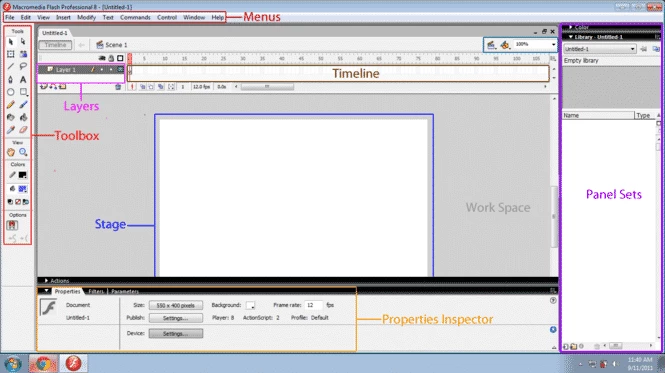

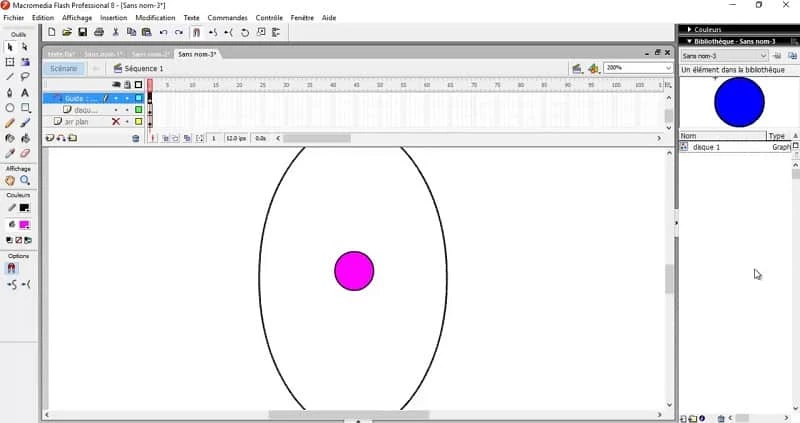
Macromedia Flash 8 is powerful multimedia graphic software used for creating animation, interactive marketing, multimedia applications, presentations, entertainment, e-learning, and a variety of other materials. You will find a plethora of tools, including graphic effects, animation, audio, video, and text to design dynamic content.
It is the best solution to enhance flexibility and functionality in your editing projects to support innovative interactive content and vector-based graphics. It is a commercial software, and available in two comprehensive editions, including Flash Basic 8 and Flash Professional 8.
Macromedia Flash 8 is the final version of Flash that was developed by Macromedia and released on September 13, 2005. Then, it was acquired by Adobe and was published as Adobe Flash CS3 Professional in 2007. It is one of the best software to offer web-based content with creative control and improved performance.
It is cross-platform utility, and allows professional graphic designers as well as new learners to create videos, animated graphics, and websites within multiple innovative capabilities such as import/export vector and bitmap images, encoding of videos, etc. It is paid software, and you can use it through subscription plans.
The installation process is straightforward, as you can download it from SoftMany. Simply click the “Download” button given on the page. Follow the on-screen instructions to install it on your Windows PC. Launch the app, and navigate to the functional, yet familiar interface.
You will find panels to manage the entire functionality into timeline animation, library assets, and property settings. You can use the timeline for creating and editing vector graphics, animating objects, and publishing your created content as a SWF file for web deployment.
It is an exciting tool to offer improved functionality to create animation and interactive web design. It offers multiple necessary tools for creating dynamic multimedia content. However, the release of other modern technologies, such as HTML5, the functionality of it is disturb, but it remains a significant part of multimedia content and web development.
No doubt, creating animation is a tedious job; you have to create multiple objects, and they need to be placed at different positions to show the motion, because more objects help to create better and flawless videos. It takes a lot of time, but within Flash 8, you can do it with the least time and energy.
The software is simple to use, as it offers multiple innovative features for your ease in managing your multimedia content creation or web development. It overcomes the Dynamism that limited the animation, and also the interactive animations on the web. So, the app proves useful to offer attractive interactions and remove the static nature of the pages. However, users need to learn skills of Flash skills, as it offers multiple innovative tasks along with animation creation.
The support for multiple vector drawing tools enables users to create vector graphics and animations. It also includes various awesome customizable animation options, including keyframing, tweening, etc, to manage your creation process more reliably. The ActionScript programming language support makes developing interactive applications and games easy. Enhance your user experience and functionality for your objects while using the built-in user interface components that are beautifully organized as Library panels.
The objects that you use to create animation are called Symbols, such as creating an object to use for a video or another video for later use, it is transformed into a Symbol and saved to a library. Likewise, Instances are the converted shape of Symbols, as at the time of using the object in a video, you have to extract the saved Symbols in the library, and this extraction is called Instances.
The software offers a streamlined workflow with a comprehensive set of tools and features for creating visually eye-catching animations, games, and other interactive presentations. There isn’t any compatibility issue, so you can manage your creation and editing process across multiple devices. Avail an efficient project development and iteration within time-saving features, and use flexible customization options for tailoring projects according to your specific design needs, such as using Font Optimization to get a huge collection of font sizes, and use the editing mode for enhancing the velocity of rotation, shape changing, color, and movement.
Pros
Cons

Adobe Photoshop 7.0 is one of innovative photo-editing apps on a professional level

Adobe Photoshop is designed for editing images, graphical designing, and manipulating digital images.

Stable and enhanced photo editing with Adobe Photoshop CS3

PicWish, edit your photos using AI advanced technology

Adobe PageMaker creating documents via scratching, templates, and images

PixelLab offers the capability of editing your photos on the big screen.